// how it works
From raw data to shareable results, without local compute
Stranded runs in your browser, and the heavy computation happens on our servers. There is nothing to install, and you don't need a powerful computer. This is what happens between uploading a file and sharing a result.
Import
Drag files into your project. We parse them server-side and index them for fast retrieval, even multi-GB files.
In your browserExplore
Open sequences in the viewer. Add annotations, find ORFs, check Sanger traces, and organise it all in folders.
In your browserRun a workflow
Select your input, pick a workflow, adjust a few options that come with sensible defaults, and click Run.
In your browserWe compute
The job runs in the background on our servers, using established tools such as MAFFT, IQ-TREE 3 and MEGAHIT.
On our serversResult saved
The result is saved as a new document next to your input, with the workflow and parameters recorded.
On our serversReview & share
Open the result in its viewer, share it with a secure link, or export it in a standard format.
In your browserStart an analysis in a few clicks
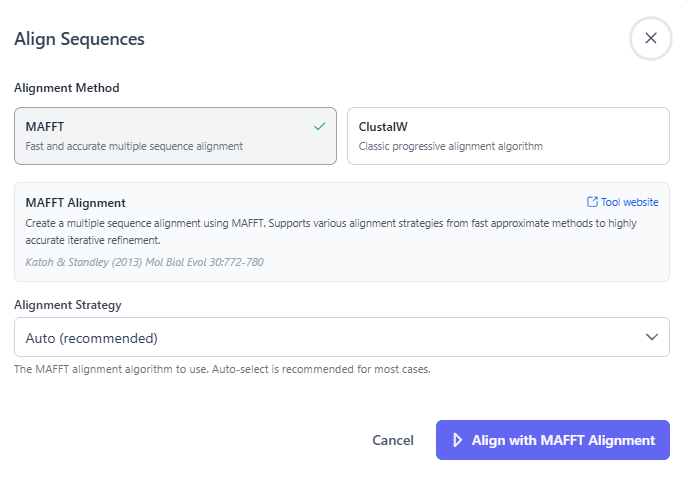
Each workflow opens a dialog with a small set of options, each with a default. No command line and no scripts.
Every result explains itself
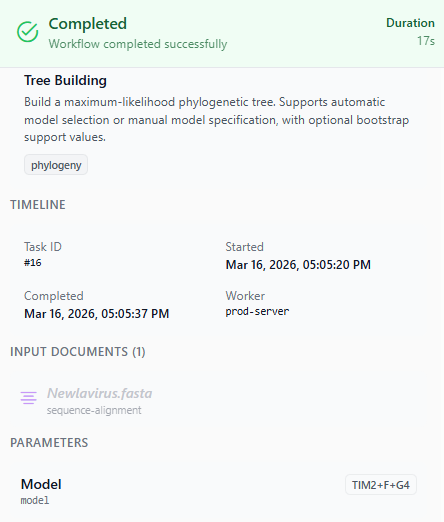
Open any result to see the workflow that produced it, the input documents, and the parameters that were used.
Workflows are built on established bioinformatics tools, including MAFFT, ClustalW, IQ-TREE 3, Bowtie2, minimap2, MEGAHIT and FastQC. See all features →
// faq
Frequently asked questions
Where do analyses run?
On our servers. Each workflow runs as a background job, and its results are saved as new documents in the same folder as the input.
Can I see how a result was produced?
Yes. Every result produced by a workflow records the workflow, the input documents and the parameters used.
Which file formats can I import and export?
Import: FASTA, FASTQ, AB1, GenBank, Newick, NEXUS, PHYLIP, SAM and BAM. Export: FASTA, FASTQ, GenBank, AB1, Newick, SAM and plain text.
Can I BLAST my sequences?
You can send a sequence to NCBI BLAST from the viewer, which opens in a new browser tab.